
※ BOB를 마무리하고 진행했던 NES 에뮬레이터 분석에 관한 내용을 망각하지 않기 위해 쓰는 글
※ 취약점에 대한 내용은 보안상 작성하지 않음
NES Emulator

- NES Emulator는 닌텐도 엔터테인먼트 시스템의 하드웨어와 소프트웨어 동작을 소프트웨어적으로 모방하여, 원래 콘솔 없이도 PC, 스마트폰 등의 기기에서 NES 게임을 실행할 수 있게 해주는 프로그램.
- 에뮬레이터는 윈도우에서 구동할 수 있도록 가상화해서 사용하며 최신 버전은 0.97 버전.
- Doc : https://www.emulator-zone.com/doc.php/nes/
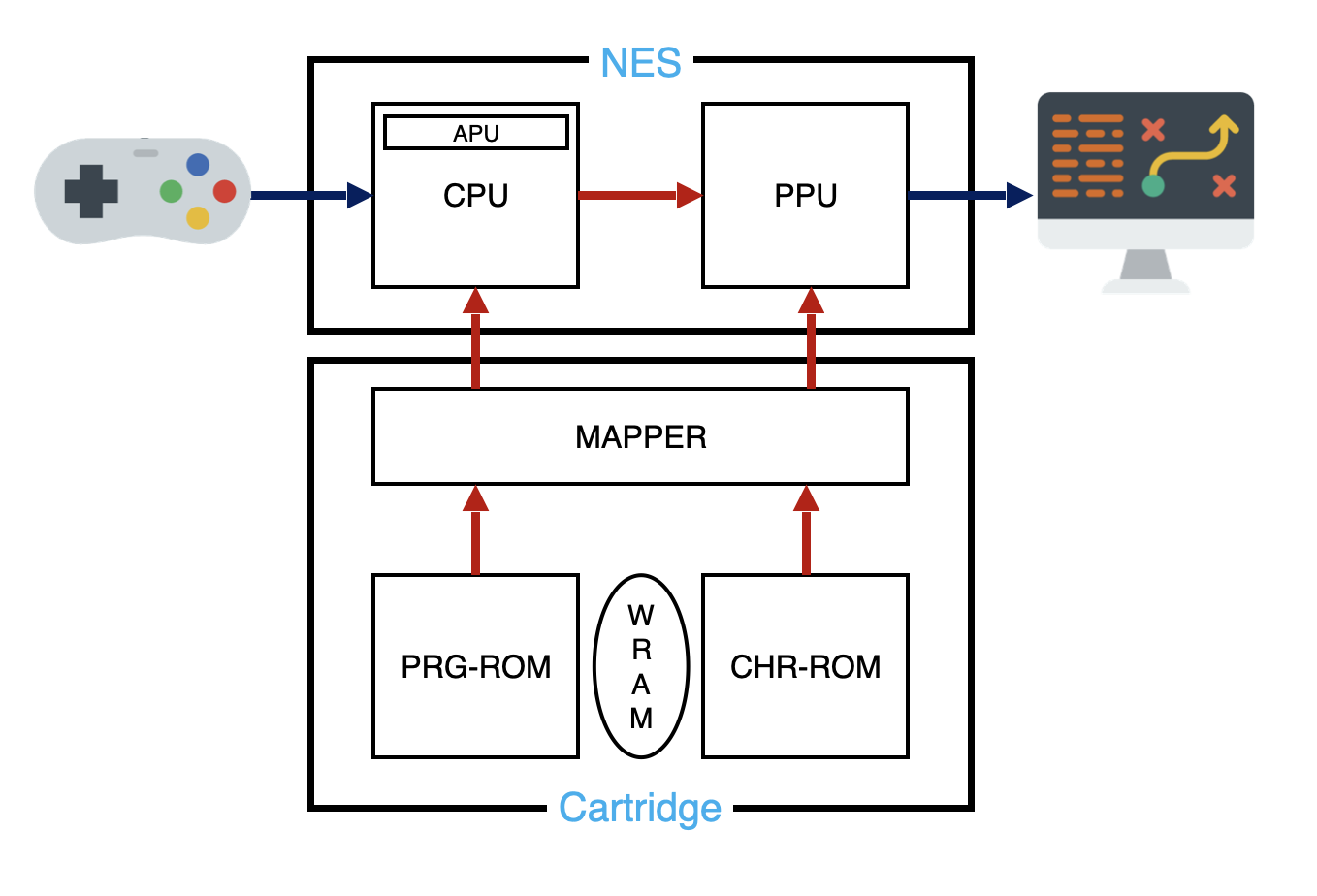
NES Emulator Architecture
- Doc : https://www.nesdev.org/NESDoc.pdf
- Source : https://github.com/yamanyandakure/VirtuaNES097
CPU (Central Processing Unit)
* CPU(Central Processing Unit)는 6502기반의 소리를 핸들링하는 기술인 pAPU를 추가한 2A03을 사용
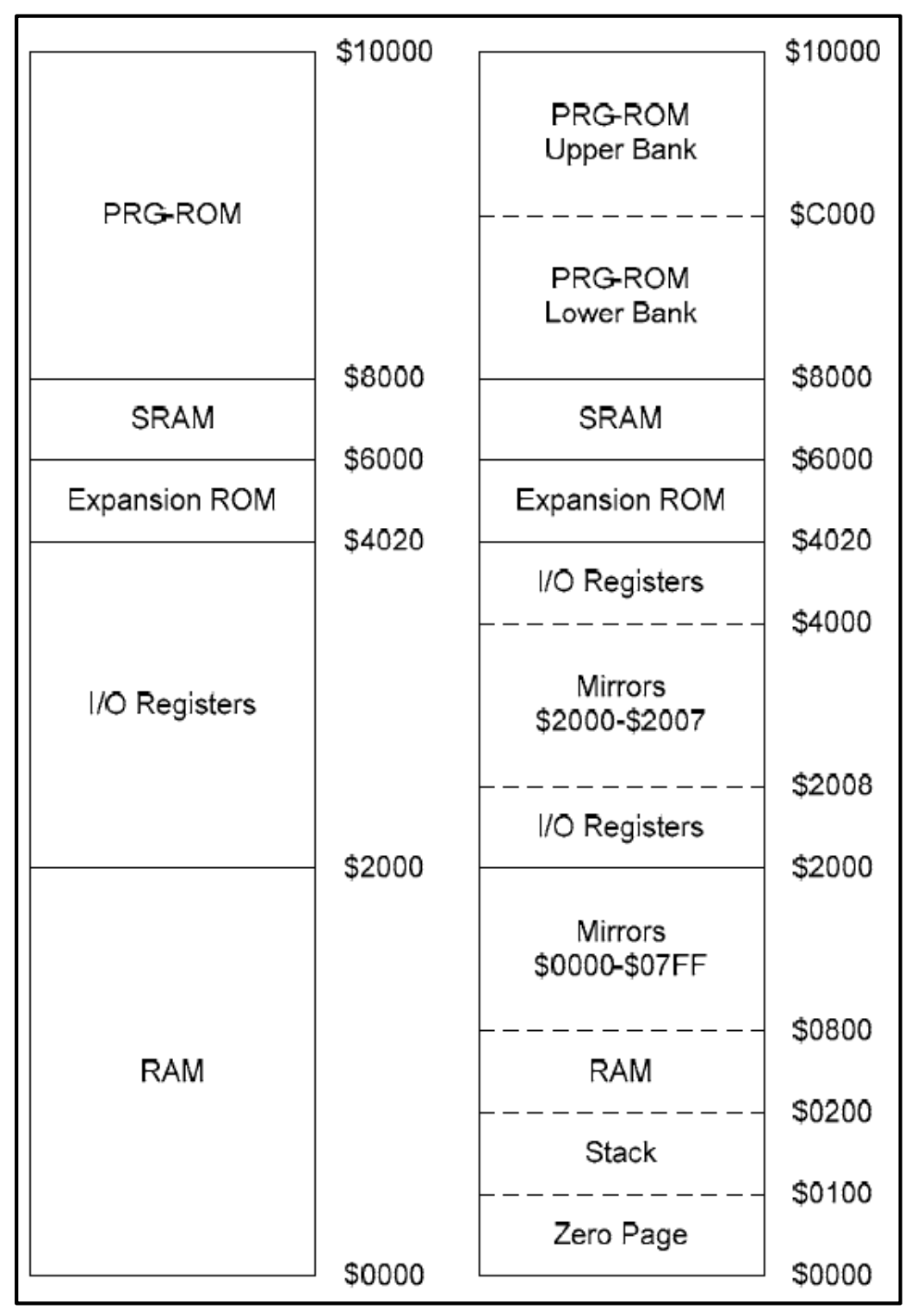
* 16 bit 주소를 사용하므로 총 64KB이며 절반인 32KB는 Cartridge ROM의 공간
* 32KB로 게임을 실행하기엔 너무 작기 때문에 MAPPER를 사용해 뱅크 스위칭 해줌
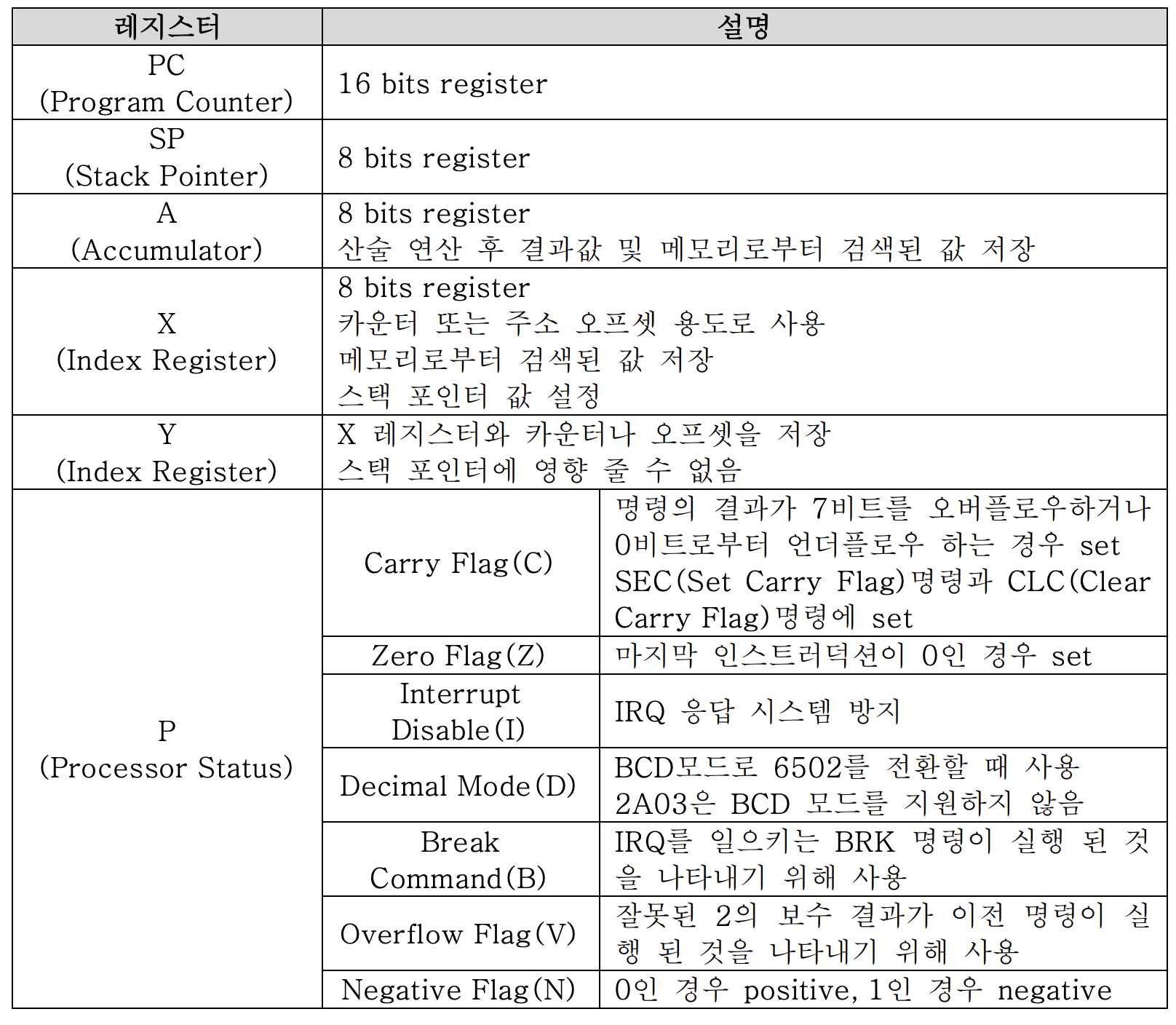
-CPU Registers-
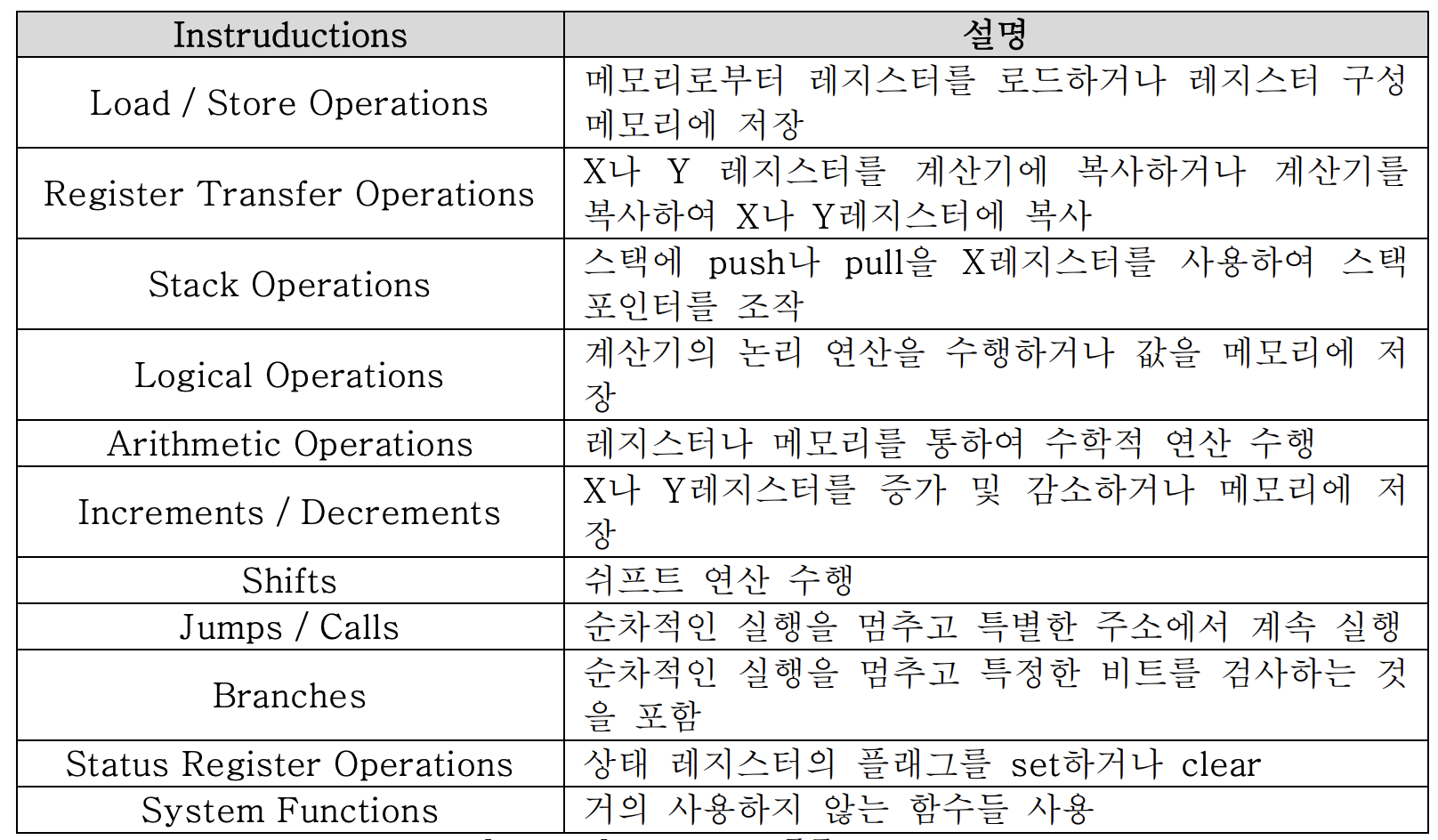
 -Instructions-
PPU (Picture Processing Unit)
* 그래픽 출력을 담당하는 커스텀 칩으로 카트리지 내의 CHR-ROM에서 실제 그래픽 데이터 가져옴
* 레지스터는 CPU의 $2000 ~ $2007를 통해 CPU의 제어를 받는다. 추가로 DMA 사용을 위해 $4014 레지스터를 사용
* Color Palettes, Pattern Tables, Name Tables, Attribute Tables를 통해 출력할 이미지를 결정하고 Scrolling 기능으로 화면에 출력
* Pattern Table : 화면의 패턴을 저장한 테이블
* Name Table : Pattern Table에 인덱싱하여 출력할 화면으로 재배열한 테이블
* Attribute Table : 화면의 색상 정보를 저장한 테이블

MMC (Multi Memory Controller) > MAPPER
* 닌텐도 패밀리 컴퓨터의 게임 카트리지에 사용된 메모리 관리칩
* CPU에서 원하는 데이터가 있는 곳으로 메모리 영역을 지속적으로 변경해줌
* 매퍼는 게임 개발자가 게임에 맞는 매퍼를 사용하거나 개발
* 일부 MMC는 메모리 관리 기능 뿐 아니라 추가 사운드나 그래픽 기능도 있음
* MAPPER는 메모리 제어와 깊은 연관이 있기 때문에 취약점이 발생할 가능성이 높은 대상
PRG-ROM
* 게임의 코드 데이터를 관리하는 데이터 메모리
CHR-ROM
* 게임의 그래픽 데이터를 관리하는 데이터 메모리
WRAM
* 게임 SAVE를 위한 램
ROM 구조
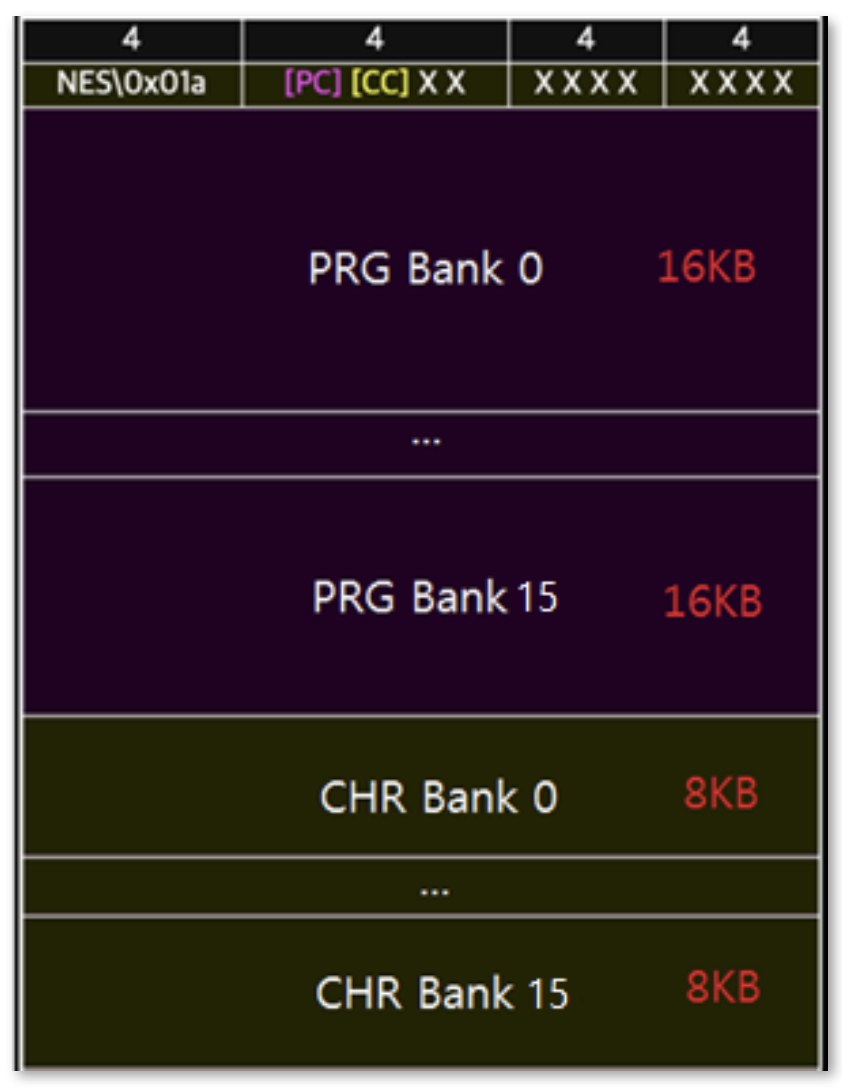
* 매직넘버(4 byte), PRG BANK 개수(1 byte), CHR BANK 개수(1 byte), 플래그(10 byte)
* PRG BANK: 16KB씩 최대 16개 PRG-ROM에 해당
* CHR BANK: 8KB씩 최대 8개 CHR-ROM에 해당
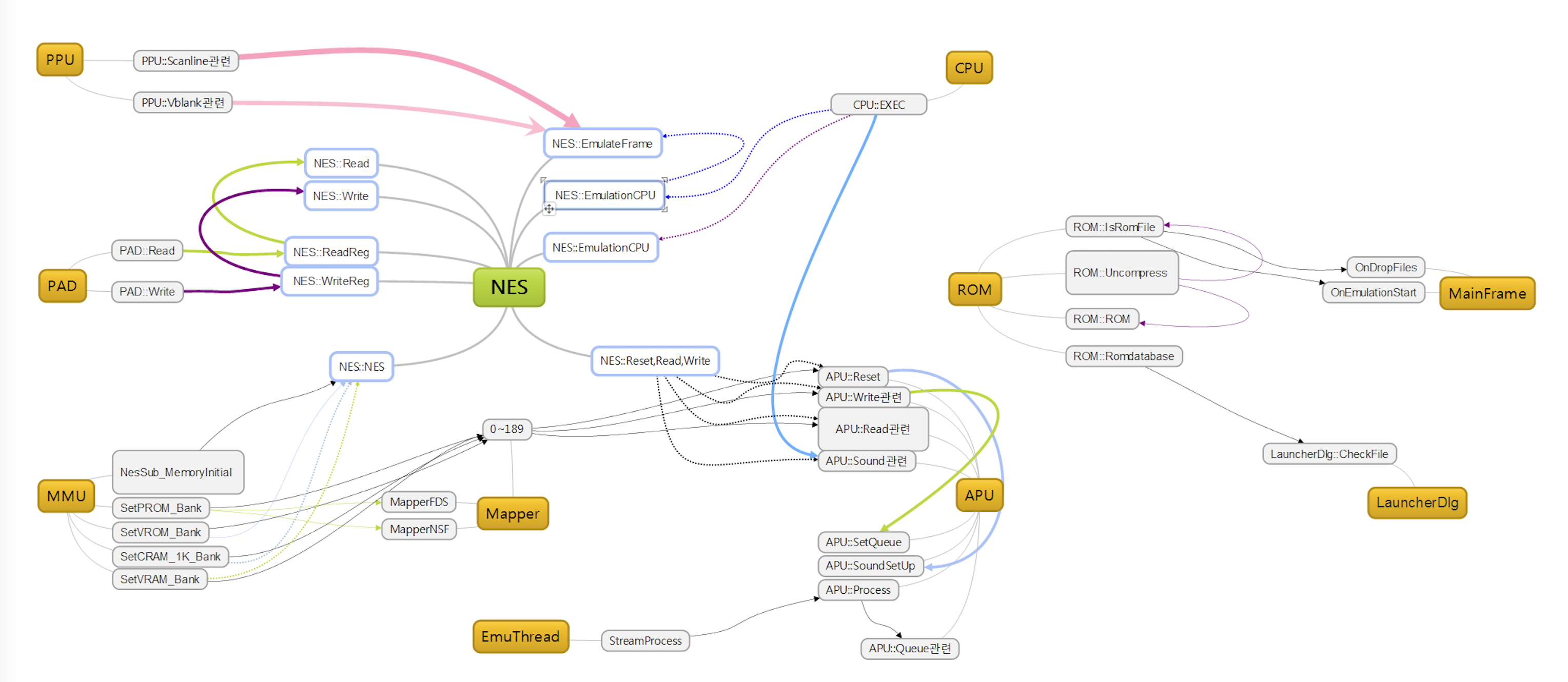
NES Flow
Cutom Rom File
- 에뮬레이터 동적 분석을 위해선 커스텀한 롬 파일 제작이 필요
- 아래 코드를 통해 간단한 롬 파일 제작 가능
/*
   Hello, NES!
   writes "Hello, NES!" to the screen
   written by WolfCoder (2010)
*/

/* Includes */
#include <nes.h>

/* Writes the string to the screen */
/* Note how the NES hardware itself automatically moves the position we write to the screen */
void write_string(char *str)
{
   /* Position the cursor */
   /* We only need to do this once */
   /* This is actually 2 cells down since the first 8 pixels from the top of the screen is hidden */

   *((unsigned char*)0x2006) = 0x20;
   *((unsigned char*)0x2006) = 0x41;

   /* Write the string */
   while(*str)
   {

  /* Write a letter */
  /* The compiler put a set of graphics that match ASCII */
  *((unsigned char*)0x2007) = *str;
  /* Advance pointer that reads from the string */
  str++;
   }
}

/* Program entry */
int main()
{
   /* We have to wait for VBLANK or we can't even use the PPU */
   waitvblank(); /* This is found in nes.h */

   /* This is a really strange way to set colors, don't you think? */
   /* First, we need to set the background color */
   *((unsigned char*)0x2006) = 0x3F;
   *((unsigned char*)0x2006) = 0x00;
   *((unsigned char*)0x2007) = 1;

   /* Then, we need to set the text color */
   *((unsigned char*)0x2006) = 0x3F;
   *((unsigned char*)0x2006) = 0x03;
   *((unsigned char*)0x2007) = 0x30;

   /* We must write our message to the screen */
   write_string("Hello, NES!");

   /* Set the screen position */
   /* First value written sets the X offset and the second is the Y offset */
   *((unsigned char*)0x2005) = 0x00;
   *((unsigned char*)0x2005) = 0x00;

   /* Enable the screen */
   /* By default, the screen and sprites were off */
   *((unsigned char*)0x2001) = 8;

   /* Wait */
   /* The compiler seems to loop the main function over and over, so we need to hold it here */
   while(1);
   return 0;
}
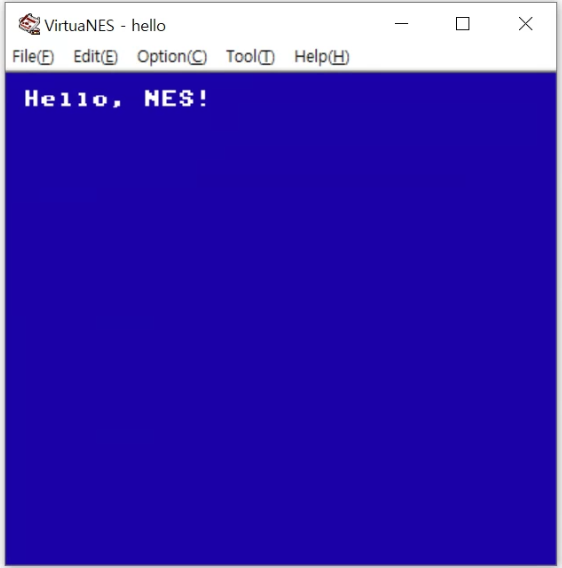
- 컴파일하고 얻은 rom 파일을 에뮬레이터에 올리면 잘 나옴.
Ref.
https://www.emulator-zone.com/doc.php/nes/
https://www.nesdev.org/NESDoc.pdf
https://github.com/yamanyandakure/VirtuaNES097
https://en.wikipedia.org/wiki/Bank_switching
http://www.bigmessowires.com/2010/06/19/bank-switching/
https://github.com/PyAndy/Py3NES
https://github.com/billymeter/pyNES
https://github.com/emullinix/NES/blob/master/EvanNES/CPU.py
https://wiki.nesdev.com/w/index.php/INES
http://datacrystal.romhacking.net/wiki/Super_Mario_Bros_3:RAM_map
http://www.romhacking.net/documents/
http://search.cpan.org/dist/Games-NES-ROM/lib/Games/NES/ROM.pm
http://fms.komkon.org/EMUL8/NES.html
http://nesdev.icequake.net/
http://www.joinc.co.kr/w/Site/Assembly/Documents/ProgrammingGroundUp/index.html